22Bet is a licensed bookmaker that has been operating in Tanzania since 2017, holding a valid license from the Gaming Board of Tanzania. The platform has grown in popularity among Tanzanian players thanks to its wide selection of betting options, competitive bonuses, and an interface that feels intuitive from the start.
To place bets, access promotional offers, or withdraw funds, you need to be signed into your account. The good news is that the login procedure at 22Bet is effortless and takes just a few seconds once you have your credentials ready.
Login to Your Tanzania Account in 2026
Before you can log into 22Bet, you need to have an existing account on the platform. Only registered users can sign in and access the full range of features. Logging in with 22Bet is straightforward, and the platform provides several convenient ways to do it.
| Login Method |
Available |
| Mobile App (Android) |
Yes |
| Mobile App (iOS) |
Yes |
| Website |
Yes |
| Lite Version |
No |
| SMS Authorization |
Yes (2FA code) |
| USSD |
No |
22Bet Mobile App Login
22Bet is widely accessible on mobile devices through dedicated apps for both Android and iOS. Whether you use a smartphone or a tablet, the app offers a smooth and complete betting experience on the go.
Follow these steps to log in through the 22Bet mobile app:
Install the official 22Bet app from the website for Android or the App Store for iOS.

Launch the 22Bet app on your mobile device after the installation is complete.

Find the login button, which is positioned at the top right area of the screen.

Input your registered Tanzanian phone number and password, then tap "Log In" to reach your dashboard.

| Feature |
Android App |
iOS App |
| OS Required |
Android 5.0+ |
iOS 12.0+ |
| Cost |
Free |
Free |
| Storage Needed |
200 MB |
100 MB |
| RAM Required |
2 GB |
2 GB |
22Bet Login via Website
Using the 22Bet website is arguably the simplest way to sign into your account. It requires no downloads and works across all browsers on desktop or mobile. Here is how to do it:
- Step 1. Visit the 22Bet website. use a direct link to navigate to the official 22Bet Tanzania homepage.
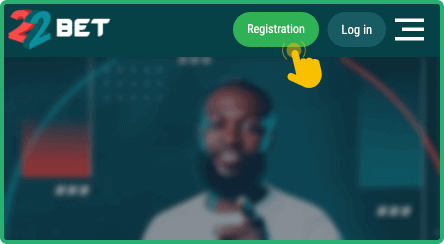
- Step 2. Click the Login button. it is located in the upper right corner of the main page.
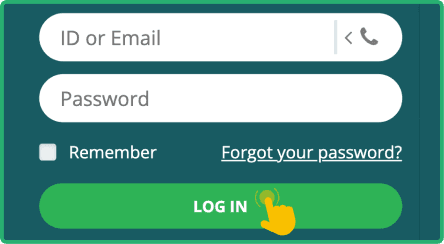
- Step 3. Enter your credentials. fill in your valid Tanzanian phone number and the password you set up.
- Step 4. Submit your information. click the green "Login" button and you will be directed to your account immediately.
If you have two factor authentication enabled, the system will ask for an SMS code before granting access.
22Bet Sign in via Lite Version
22Bet does not currently offer a lite version of its website. Tanzanian users who need a lighter experience can rely on the mobile site, which loads efficiently and adapts well to slower internet connections. The mobile browser version retains all core functionality, including full account access and betting features, so it serves as a practical alternative for users on older devices or limited data plans.
22Bet Data Free Login
Understanding data consumption is crucial for Tanzanian bettors who want to manage their internet costs effectively. 22Bet does not currently partner with local mobile operators to provide zero bundle or data free access to the platform.
However, there are still ways to reduce data usage. You can access the mobile site through your browser, which consumes less data than loading the full desktop version. Disabling images and turning off automatic video loading within your device settings can also help. Using the mobile app is another option, as apps generally consume less data than browser sessions once they are installed. For users with two factor authentication enabled, SMS codes use minimal data since they arrive through the cellular network rather than the internet.
22Bet Sign In Issues and Solutions
Even with a user friendly platform, login issues can occasionally occur. Understanding common problems and their solutions helps ensure uninterrupted access to your betting account. Below are the situations players encounter frequently and how to resolve them.
- Forgotten Account Password
Forgetting your password is one of the more common issues, and it is nothing to worry about. 22Bet provides a straightforward recovery process. On the login page, tap the "Forgot your password?" link. The system will prompt you to enter your phone number or email, then send a recovery code so you can create a new password and regain access.
After several failed login attempts, 22Bet may temporarily lock your account as a security measure. This is standard practice designed to protect your funds and personal information. If this happens, here is what you can do:
- Wait at least 30 minutes before trying to log in again.
- Reset your password if the lockout persists after the waiting period.
- Contact customer support for immediate assistance if you still cannot get in.
- Double check that your account details are entered correctly before each attempt.
- Technical Issues With Account Login
Sometimes login problems are caused by technical factors rather than incorrect credentials. The table below outlines common causes and their solutions.
| Issue |
Possible Cause |
Solution |
| Page not loading |
Weak internet connection or server maintenance on the site |
Switch to a stable Wi Fi network or try again after a few minutes |
| App crashes on login |
Outdated app version or insufficient device storage space |
Update the app to the latest version and clear the device cache |
| "Invalid credentials" error |
Incorrect phone number format or a mistyped password entry |
Verify that you are using the correct country code and retype carefully |
| Browser compatibility issue |
Using an outdated browser that does not support site scripts |
Update your browser or switch to Chrome, Firefox, or Safari |
| Two factor code not arriving |
Network delay or incorrect phone number linked to account |
Wait a minute and request the code again or check your linked number |
If none of these solutions resolve the issue, reach out to 22Bet customer support through one of these channels:
- Live chat on the 22Bet website or app
- Email at [email protected]
- Phone at +357 25 82 99 00