
BetWinner is an international bookmaker that has gained popularity among Tanzanian players thanks to its wide betting line and support for local payment methods like M-Pesa. The platform offers competitive odds, a solid mobile experience, and multiple registration options that make it accessible to users across Tanzania.

How To Register a BetWinner Account: Easy Guide 2026 for Tanzania
Min.payout
30 TZS
Min. deposit
5 BWP
Payout Speed
instant or up to 24 hours
Withdrawal limit
30 000 000 TZS
BetWinner Welcome Bonus
200% of up to 565 000 TSH
Play Now
21+
| New customers only
BetWinner Account Registration Overview
Registration is a mandatory step before you can place bets on sports, access live streaming, deposit funds, or claim promotional offers.
The process on the BetWinner website can seem a bit confusing for newcomers, especially with all the fields that need to be filled out. That is why we have prepared a detailed guide covering every registration method available.
Registration Options at a Glance
| Method | Internet required | Time to register |
|---|---|---|
| Website (PC) | 5 minutes | |
| Mobile app (Android/iOS) | 5 minutes | |
| Via SMS (two factor authentication setup) | ~3 minutes |
Who can register with BetWinner?
- Users located in Tanzania are accepted on the platform
- Players must be at least 18 years old
- Identity confirmation through a valid ID or passport copy is required
Mobile App Registration
BetWinner offers a dedicated Android app (requires Android 5.0 or higher, 100 MB of free space, and 1 GB RAM) as well as an iOS app (requires iOS 12.0 or higher, 120 MB of free space, and 1 GB RAM). Using the app allows you to register and place bets from your phone or tablet at any time. Both apps are available for download directly from the official BetWinner website.
Here is how to register through the mobile app:
1
Open the BetWinner official website
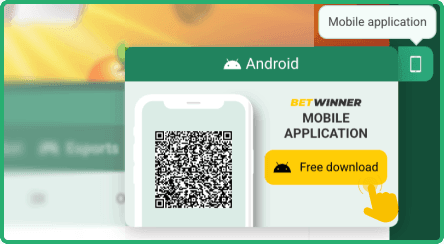
Open the BetWinner official website on your mobile device using any browser and navigate to the app download section for your operating system.
2
Download the application file
Download the application file and, if you are on Android, allow installations from unknown sources in your device settings before proceeding with the installation.

3
Launch the app and tap the Sign Up button
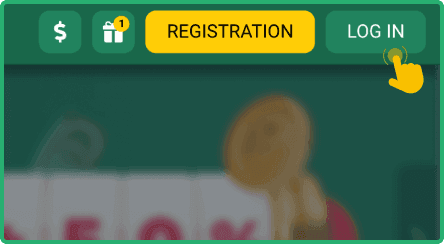
Launch the app and tap the Sign Up button located in the upper right corner of the screen.
4
Fill in the registration form
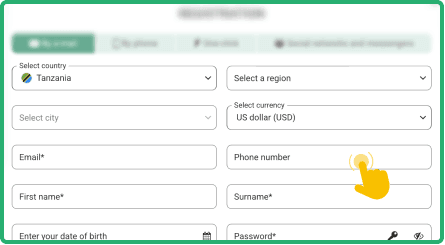
Fill in the registration form with your country, city, email, phone number, first name, last name, date of birth, and password. Enter a promo code if you have one, then check the boxes to agree to the terms.
If you prefer not to download the app, you can access BetWinner through your mobile browser. Safari, Chrome, and Opera Mini all work well with the mobile version of the site.


Register Online Via PC
Registering through the desktop version of BetWinner is straightforward and works with popular browsers such as Chrome, Firefox, Safari, and Microsoft Edge.
Follow the steps below to create your account.
- Open the official BetWinner website by typing the URL into your browser's address bar. Make sure you are on the legitimate site to protect your personal data.
- Click the Sign Up button located in the upper right corner of the homepage. This will open the registration form in a new window.
- Complete the registration form by entering your country, city, email address, phone number, full name, date of birth, and a secure password. If you have a promo code, enter it in the designated field. Check all required boxes to accept the terms and conditions.
- Verify your account by clicking the confirmation link sent to your email or by entering the code sent to your phone number.
Always use real, accurate data when registering. BetWinner will ask you to verify your identity before processing withdrawals, so any false information could lead to account suspension.
Sign Up Via SMS
BetWinner does not offer a direct SMS or USSD registration method in Tanzania. However, the platform does support two factor authentication (2FA) via SMS codes, which adds an extra layer of security to your account after registration.
Here is how to activate SMS based two factor authentication:
- Log in to your BetWinner account through the website or app using your login credentials.
- Navigate to the "Security" section, then select "Two factor authentication" from the available options.
- Choose the "SMS code" method and enter your phone number in the international format (for example, +255 XXX XXX XXX for Tanzania).
- Confirm the SMS code you receive on your phone, then click "Activate 2FA" to complete the setup.
Once activated, every login attempt will require an additional code sent to your phone. This helps protect your account from unauthorized access, which is especially useful if you share devices or use public networks.
BetWinner Registration Bonuses 2026
BetWinner is generous when it comes to rewarding both new and regular players. New users who sign up and make their first deposit can claim a welcome bonus of up to 125% on the deposit amount. Beyond the welcome offer, regular players can take advantage of a 100% referral bonus every Thursday and a weekly sports cashback of 3% on losing bets. These ongoing promotions help keep the experience rewarding well after your first wager.
BetWinner Sign Up Terms and Conditions for Tanzania
Residents of Tanzania who create an account on BetWinner should familiarize themselves with the platform's terms and conditions. Below are the key points to keep in mind.

Account verification
after registration, you will need to verify your identity by submitting a copy of your ID or passport. This step is required before you can make withdrawals and ensures the security of your account.

One account per player
each user is allowed to create only one account on BetWinner. Creating multiple accounts is a violation of the platform's rules and may result in the suspension of all associated accounts.

Valid mobile number
a working phone number is required during registration. This number is used for account verification, two factor authentication, and communication from the support team.

Responsible gaming
BetWinner takes responsible gaming seriously. Users who exhibit signs of problem gambling may be restricted or excluded from the platform. Tools for setting deposit limits and self exclusion are available in your account settings.
By signing up with BetWinner, you automatically agree to all of these conditions. We encourage you to read the full terms and conditions on the official website before completing your registration.
FAQ
How long does it take to register on BetWinner?
The entire registration process typically takes around five minutes. You will need to fill in the registration form and verify your account through email or phone. Once verification is complete, you can start using the platform immediately.
Can I register without a Tanzanian phone number?
You can register using a phone number from another country, as long as it is a valid and active number. However, using a Tanzanian number makes the process smoother, especially for mobile payment methods like M-Pesa and for receiving SMS verification codes.
Is it safe to register with BetWinner?
BetWinner uses encryption technology to protect your personal data during registration and throughout your use of the platform. Two factor authentication is also available to add an extra security layer to your account.
What should I do if registration fails?
First, double check that all fields are filled in correctly and that your internet connection is stable. If the problem persists, try using a different browser or clearing your cache. You can also contact BetWinner support via live chat or email at [email protected].
Why am I not receiving the verification code?
Make sure your phone number is entered in the correct international format and that your device has a stable network signal. Check your spam or junk folder if you are waiting for an email code. If the issue continues, reach out to customer support for assistance.