
Bikosports is a bookmaker in Tanzania that attracts players with the opportunity to place bets in local currency, bonuses for newcomers, and prompt service. If you want to start placing bets with this operator, the registration process is your first step. Below, we walk you through everything you need to know.

How To Register a Bikosports Account: Easy Guide 2026 for Tanzania
Min.payout
1000 TZS
Min. deposit
1 TZS
Payout Speed
up to 24-48 hours
Withdrawal limit
No limits
Bikosports Welcome bonus
---
Play Now
21+
| New customers only
Bikosports Account Registration Overview
Registration is a mandatory step before you can start betting on sports, depositing funds, or claiming promotional offers with Bikosports.
The process on the Bikosports website might seem a bit confusing for newcomers, especially if you are not sure which fields to fill in or what to expect. That is why we have prepared a detailed guide to help you complete it properly.
Registration Options at a Glance
| Method | Internet required | Time to register |
|---|---|---|
| Website | ~2 minutes | |
| Mobile app (Android only) | ~2 minutes |
Who can register with Bikosports?
- Residents of Tanzania who are at least 18 years old
- Players must confirm their identity by providing a copy of a valid ID or passport
- Each user may hold only one account
Mobile App Registration
Bikosports offers a mobile app for Android devices running OS 6.0 or higher. The app is free, requires about 100 MB of storage and 2 GB of RAM. It allows you to register, place bets, and manage your account directly from your phone or tablet. There is no iOS app at this time, so iPhone users should use the mobile website instead.
Here is how to register through the app:
1
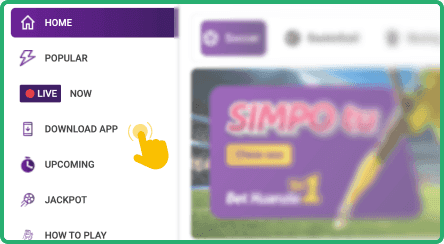
Open the official Bikosports website
Open the official Bikosports website on your Android device and navigate to the app download section.
2
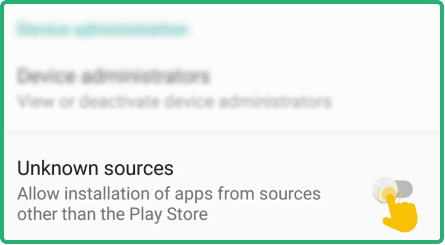
Download the APK file
Download the APK file and allow installations from unknown sources in your phone settings.
3
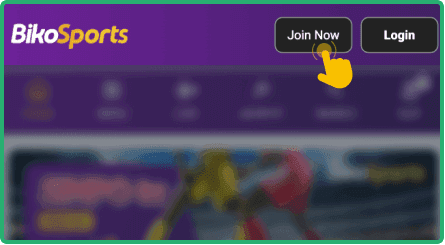
Install the app and tap "Join Now"
Install the app, then open it and tap the "Join Now" button in the upper right corner.
4
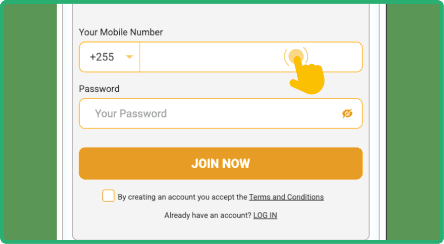
Enter your phone number and password
Enter your phone number and create a password, then check the boxes to agree to the terms and conditions.
If you prefer not to download the app, you can access Bikosports through your mobile browser. Popular options include Chrome, Opera Mini, and Firefox, all of which work well with the mobile site.

Register Online Via PC
Registering on the Bikosports desktop website is straightforward and takes only a couple of minutes. You can use any modern browser such as Google Chrome, Mozilla Firefox, Microsoft Edge, or Safari.
Follow these steps to create your account:
- Step 1: Open the official Bikosports website. Open the official Bikosports website by typing the URL into your browser's address bar.
- Step 2: Click the "Join Now" button. Click the "Join Now" button located in the upper right corner of the homepage.
- Step 3: Fill in the registration form. Fill in the registration form by entering your phone number and choosing a secure password.
- Step 4: Agree to the terms and conditions. Check the required boxes to confirm that you agree to the terms and conditions of the platform.
- Step 5: Verify your account. Verify your account by following the instructions sent to your phone number.
Always use your real personal details when registering. Bikosports will ask you to confirm this information later, particularly when you request a withdrawal. Providing false data can lead to account suspension.
Bikosports Registration Bonuses 2026
Bikosports is generous when it comes to rewarding both new and regular players. After signing up, new users can claim a welcome 100% bonus on their first deposit. There is also a no deposit bonus of 150 TZS, available simply after registration and profile completion.
Beyond the welcome offer, Bikosports provides a multistock booster that can range from 3% to 750%, depending on the number of events in your express bet. To activate any bonus, you may need to top up your account, place bets on certain sports or with specific odds, and meet deadlines for using the bonus. Always check the exact conditions on the official website or contact support, as terms may change.
Bikosports Sign Up Terms and Conditions for Tanzania
Residents of Tanzania who sign up with Bikosports should familiarize themselves with the platform's terms and conditions. Here are the key rules to be aware of:

Valid mobile number
You must register with an active Tanzanian phone number. This number will be used for account verification, communication, and potentially for deposits and withdrawals through mobile money services.

One account per player
Each person is allowed to create only one account on the platform. Attempting to open multiple accounts can result in all accounts being suspended and any funds being forfeited.

Account verification
Bikosports requires you to verify your identity before processing withdrawals. You will need to submit a copy of your ID, passport, or another accepted document to confirm your personal details.

Responsible gaming
The platform promotes responsible gambling practices. Users who exhibit signs of problem gambling may be restricted or excluded from the platform to protect their wellbeing.
By signing up with Bikosports, you automatically agree to all of these conditions. We encourage you to read the full terms and conditions on the official website before creating your account.
FAQ
How long does Bikosports registration take?
The entire registration process typically takes no more than two or three minutes. You only need to provide your phone number, set a password, and agree to the terms. Verification may add a short wait if document review is required.
Can I register without a Tanzanian phone number?
No, Bikosports requires a valid Tanzanian mobile number to complete registration. This number is used for verification and account security. If you do not have a local number, you will not be able to create an account.
Is it safe to register with Bikosports?
Yes, Bikosports operates in Tanzania and uses security measures to protect user data. Your personal information is handled according to the platform's privacy policy. Always register through the official website or app to avoid fraudulent sites.
What should I do if registration fails?
First, check that you have entered a valid phone number and that your internet connection is stable. Try clearing your browser cache or switching to a different browser. If the problem persists, contact Bikosports support via live chat, email at [email protected], or phone at 0222 220 100.
Why am I not receiving the verification code?
Network delays can sometimes cause a short wait for SMS delivery. Make sure your phone has signal and that your inbox is not full. If the code still does not arrive after several minutes, request a new one or reach out to customer support for assistance.