
Vivagame has gained strong popularity among Tanzanian bettors thanks to its wide selection of sports disciplines, live betting options, and multi bet layouts. The platform also stands out with no wager bonuses and a user friendly interface that supports informed decision making for players across the country.

How To Register a Vivagame Account: Easy Guide 2026 for Tanzania
Min.payout
1000 TZS
Min. deposit
1000 TZS
Payout Speed
up to 24 hours
Withdrawal limit
No limits
Vivagame Welcome Bonus
Up to 1 010 000 TSH
Play Now
21+
| New customers only
Vivagame Account Registration Overview
Registration is a mandatory step before placing wagers, accessing live betting markets, or claiming promotional offers on Vivagame.
The process on the platform might seem slightly confusing for newcomers who are unfamiliar with the required fields. That is exactly why we have prepared a detailed walkthrough of the registration procedure.
Registration Options at a Glance
| Method | Time to complete |
|---|---|
| Mobile website | 2 to 3 minutes |
| PC (website) | 2 to 3 minutes |
Who can register with Vivagame?
- Residents of Tanzania who are 18 years of age or older.
- Confirmation of identity through a valid ID or passport copy is required during the verification stage.
Mobile App Registration
Vivagame does not offer a dedicated Android application at the time. The mobile browser version is perfectly optimized for the players' needs and allows quick access to all betting features directly from your phone or tablet.
Follow these steps to register through the mobile browser version:
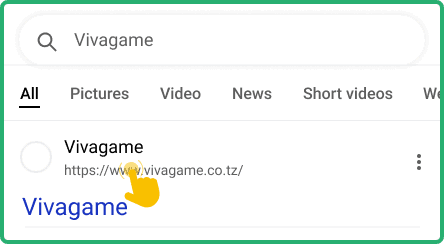
1
Open the official Vivagame website
Open the official Vivagame website using your mobile browser to access the registration page.
2
Tap the Register button
Tap the Register button located in the upper right corner, then fill in your phone number and create a password to complete registration.

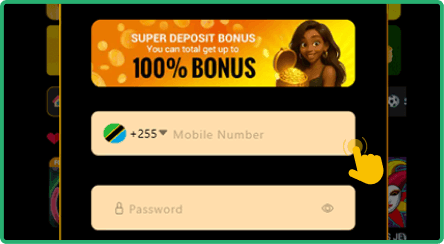
5
Fill in your personal data
Fill in the form using your Tanzanian mobile phone number and your password. All data must be correct and valid.
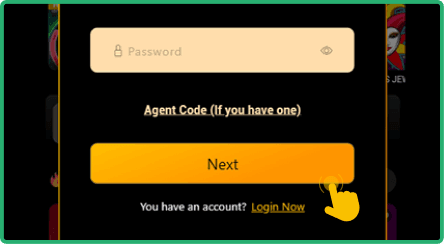
5
Go through the rest of the steps
Fill in the necessary data, finish your registration and start using the website.
Mobile version of the website works smoothly through browsers such as Chrome, Opera Mini, or Firefox on any smartphone or tablet.
Register Online Via PC
Desktop registration on Vivagame is straightforward and works well in popular browsers like Google Chrome, Mozilla Firefox, Microsoft Edge, and Safari. The entire process takes no more than a few minutes when all your details are ready.
Follow the steps below to create your account:
- Navigate to the official Vivagame website by typing the URL into your browser's address bar and wait for the homepage to load completely.
- Locate the Sign Up button in the upper right corner of the page and click on it to open the registration form.
- Complete all required fields in the form, including your phone number and a secure password, then submit the information.
- Verify your account by following the confirmation instructions provided after form submission to activate full access.
Always use accurate personal information during registration. The platform will require identity confirmation during any withdrawal request, so the details must match your official documents.
Sign Up Via SMS
Vivagame does not currently support SMS or USSD registration for users in Tanzania. The available registration methods are through the official website on desktop or mobile, as outlined in the sections above.
Vivagame Registration Bonuses 2026
Vivagame is generous toward both new and returning players with a solid selection of promotional offers. New users can claim a welcome 100% bonus upon their first deposit, which provides a strong starting boost. Beyond the welcome package, regular players have access to sports cashback and an accumulator boost feature that increases potential returns on multi bet selections.
Welcome Bonus
Up to 1 010 000 TSH
Vivagame Sign Up Terms & Conditions for Tanzania
Tanzanian residents who create an account on Vivagame should familiarize themselves with the platform's terms and conditions. The following rules apply to all registered users:

Account verification requirement
Every new player must complete identity verification by submitting a copy of a valid ID or passport. This process ensures that all accounts belong to real individuals and protects the platform from fraudulent activity.

Single account policy
Each player is permitted to hold only one account on Vivagame. The creation of duplicate or multiple accounts will result in suspension or permanent closure of all associated profiles on the platform.

Valid phone number
A working Tanzanian mobile number is required during registration. This number serves as the primary means of account confirmation and communication between the platform and the user.

Responsible gaming commitment
Vivagame monitors player behavior for signs of problem gambling. Users who exhibit compulsive patterns may face account restrictions or exclusion from the platform to ensure their wellbeing.
By completing the sign up process on Vivagame, users automatically agree to all these conditions. Reading the full terms and conditions on the official website before registration is strongly recommended.
FAQ
How long does the Vivagame registration process take?
The entire registration on Vivagame typically takes between two and three minutes. You only need to provide your phone number and create a password. Account verification may require additional time depending on document review.
Can I sign up without a Tanzanian phone number?
A valid Tanzanian mobile number is required to complete registration on Vivagame. The platform uses this number for account confirmation and security purposes. International numbers are not accepted during the sign up process.
Is registration with Vivagame safe?
Vivagame employs standard security protocols to protect user data during registration and beyond. Personal information is handled in accordance with the platform's privacy policy. Players can also contact support via live chat or email at [email protected] for any concerns.
What should I do if the registration process fails?
First, check that all fields are filled in correctly and that your internet connection is stable. Clear your browser cache and try again. If the issue persists, reach out to the Vivagame support team through live chat for assistance.
Why am I not receiving the verification code?
Network delays from your mobile operator can sometimes cause a lag in code delivery. Make sure your phone has signal and sufficient storage for incoming messages. If the code still does not arrive, request a new one or contact customer support.